

Best free platforms to create and sell online courses
The world of online courses is heating up! More and more businesses are venturing into the online learning world to share their know-how, get on the holy grail of passive income and build a community devoted to the brand. If you are ready to dip your toe in, a free platform is a good place to start.
Let’s take a very quick look at platforms that offer a free level. Not just a free trial, a truly free plan that you can stay on forever if you wanted to.
Standalone platforms
These have everything you need to get started so typically, there is very little setup invovled. In the ideal world, you’d enter your content, add a few branding elements, and it’d be good to go.
Platform #1 MemberVault
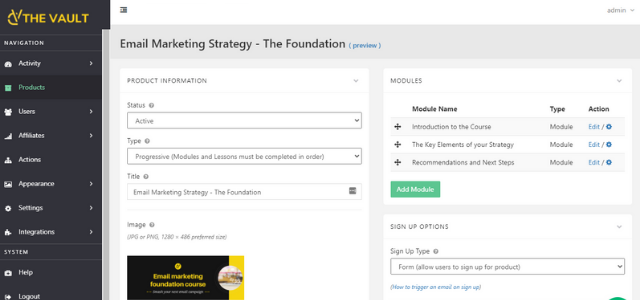
MemberVault offers the most generous free plan in the standalone course platforms I tried out. It’s easy to use and quick to set up. It focuses on doing courses very well and leaves the extra bits that sometimes goes with it, to the tools that do it best. Here’s a quick overview:
What’s to like?
- Up to 100 free users/students/members on your course
- 3 active courses
- Quick set up, customisable, user-friendly
- ALL the course creation functionality they offer is free to use – nothing is off-limits
- Paid recurring membership is supported
- Great support (including an engaged Facebook Community if that’s your thing)
- Gamification (one of those features where, if you know, you know)
- Payment and email integration with the likes of Zapier, Mailchimp, Active Campaign, Stripe, Paypal and more
- Grows with you as the first paid level is reasonable priced
What’s not quite hitting the mark?
- Membership functionality is not as comprehensive as the big guys
- It is not an all-in-one system which can be quite a shock some – “Does MemberVault send emails?” is a question that comes up quite often
- No traditional community element so don’t close down your Facebook group just yet
- It doesn’t have a “landing page” as you know it but there is the concept of one which requires of bit of design magic to make it stand out
Summary
MemberVault may be “young” in the online course world, but if you are looking for a “ready-to-go” platform to host (& sell) your online course or recurring membership and have straightforward requirements then this is absolutely perfect. If you are looking for a complex set up that involves hiding a page from Mark but showing it to Martha every second Tuesday as long as Sarah is still signed in, then you need something else.
Platform #2 Thinkific
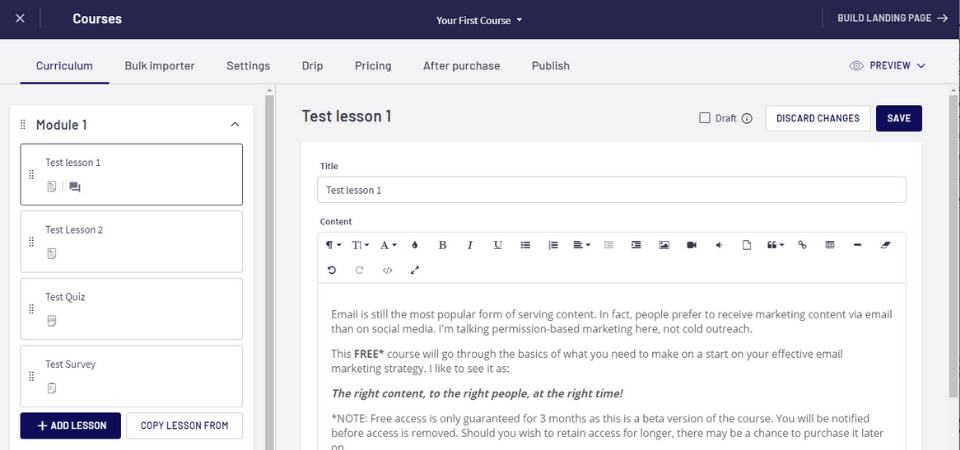
Thinkific is one of the well known standalone platforms. It also has a free plan (which is why it’s on this list) and
What’s to like?
- 1 free course (you may see 3 courses mentioned in many reviews so it looks like this was a recent change)
- Unlimited students
- Hosts videos
- Feature-rich landing page builder
- Built-in community element with the likes of Disqus and more
- Easy to set-up – I loved their onboarding wizard which took you through setting up your first course from start to finish
- 24/7 support and comprehensive database
What’s not quite hitting the mark?
- The limitations on the free plan – no Zapier or email integration
- The cost of the basic paid plan is quite a jump from the free offering
- One course is quite limiting
- 2-step checkout can leave a few sales behind
Summary
If you only have one course to sell and you don’t need seamless integration with other tools such as your email marketing provider, then Thinkific is a great option. It is already well-known and requires little upfront tech work.
All-in-one platforms
All-in-one platforms offer all you need to create, sell and market your course. They are a one-stop-shop really and aim to replace your website, email marketing tool and payment platform. There is an appeal in having one system that does it all but it is very important to choose a robust one so you are less affected by blanket downtime!
Platform #3 New Zenler
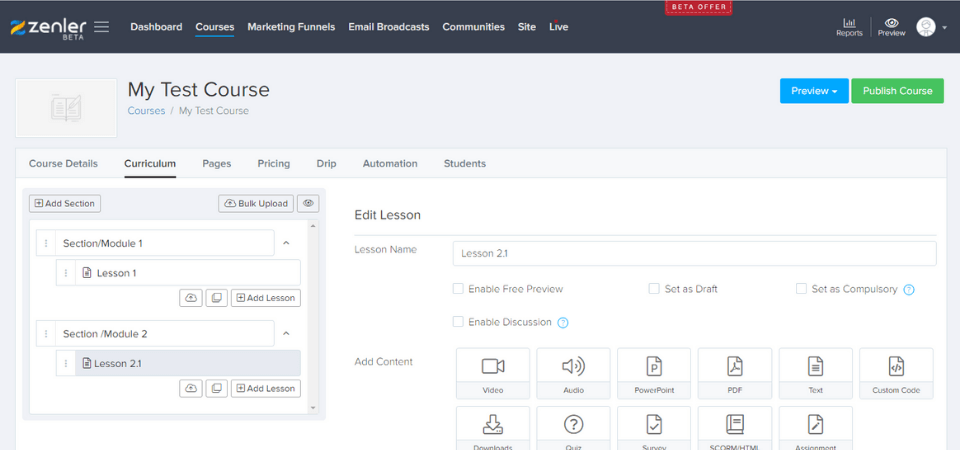
New Zenler is a very new kid to the block. Launched in 2019 and is working hard to get its name out there. I gave it a whirl and he’s what I found.
What’s to like?
- Quick and easy set-up
- You can bulk-upload your course
- Supports various material formats like video, audio, pdf, Powerpoint etc
- There’s a community/discussion element
- Website builder including landing page and a blog element
- There are some integrations provided such as Stripe and Zapier (need to upgrade for the likes of Paypal)
- You can upsell at checkout like a traditional cart
- Can host live classes using Zoom
What’s not quite hitting the mark?
- Page creation can be quite slow
- The platform still says it’s in beta which doesn’t instil confidence
- Email marketing functionality is very limited
- This is slightly vain but it is not the prettiest of sites to work with
- Paid plans are charged yearly
Summary
If you are looking for a free All-in-one alternative and can’t afford the eye-watering price of Kajabi, New Zenler is worth checking out. It is looking like quite a powerful all-rounder. The “Beta” text splattered on it could be a clever marketing ploy or result in future loss of features so approach with caution.
WordPress LMS plugins
If you already have a WordPress website then you may be sitting on the perfect solution already (unless you are not a big fan of WordPress!). Having your course on your website helps with brand continuity as students don’t have to jump to a different site. You also have all your content in one place which is great for integration (not so much for downtime).
There are a variety of plugins in this space that you can use. Free ones without a payment option are TutorLMS and Master Study LMS.
The 2 mentioned below, allow payment processing in the free version. I will start with a summary for each then the pros and cons for hosting your course on your WordPress site.
Platform #4 LearnPress Plugin

Summary
LearnPress is a great plugin with lots of free features including integrated email and payment via Paypal. On the first install, there is a very basic setup wizard which helps you get started. The course elements are easy to set up – lessons, quizzes and the whole course structure. The front end is pretty sleek and it inherits your theme styling.
If you are already familiar with WordPress then this a very good plugin to go with and there is no yearly recurring fee should you choose to go premium. Just one-off fees for add-ons. However, there are rumours online that it is somewhat lacking in the support area.
Platform #5 Namaste! LMS Plugin
Summary
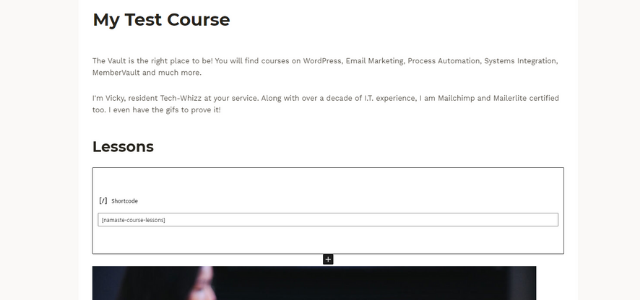
Namaste! LMS appears to be largely unheard of but I love that it integrates with Woocommerce in the free version. Shortcodes are used a lot in the content and navigation setup so there is potentially quite a lot of setup involved. There are free advanced features like certificates and badges. There is a recurring yearly fee for “upgrades” should you wish to use the pro features. Currently, it is 60% of the basic pro price of $67 so certainly affordable.
What’s to like?
- With both of these options, you get unlimited courses and lessons.
- A lot of design flexibility if you know how to code (mainly HTML and CSS)
- Easy to add extra functionality as there’s probably a plugin for everything
- Potentially no additional cost as you are already paying for your website
- WordPress is a popular platform so if you pick a popular plugin like LearnPress, there will tons of tutorials out there
What’s not quite hitting the mark?
Essentially with WordPress, more control means more responsibility.
- You have to do all the underlying setup work yourself. That snazzy login page and member’s area won’t create itself
- There is a lot of overhead from the above and also ongoing maintenance with plugin updates, security costs and conflict troubleshooting
- If your course takes off, you may need to upgrade your hosting to handle the traffic increase and bandwidth
Wildcard category – Landing pages
If you haven’t got a website but you have an email marketing tool then you could create your own online learning ecosystem. Let’s take the likes of Mailchimp. You get unlimited landing pages (this is just a web page for a very specific purpose) on the free plan and you can take payments too.
You can structure the pages to give them a cohesive feel. For example, create a page for each module, with lessons linking to their individual pages. Add buttons on those individual pages to go back to the main module page or to the next/previous lesson. However, you may end up with an unmanageable number of pages. I would only choose this route if you’ve got very few lessons or content that overrides each time – say a monthly membership where the previous month’s content doesn’t need to be retained.
Wrapping up
I tried not to make this a “MemberVault vs Thinkific” or “WordPress vs New Zenler” type post. Each of these brings something different to the table (on top of course creation) so you need to make your decision on your requirements. I would also suggest taking into account how easy it will integrate with other tools you are using. A smoother integration means a more automated and streamlined process.
On the standalone front, MemberVault gets my vote. If you need help setting things up or integrating with your other tools then do get in touch. I would love to help.
If you have a WordPress site, and are keen to keep everything in the same place, then you really can’t go wrong with the plugins mentioned. You may want to invest in a plugin that comes with a membership element though.
Ultimately, the best way to know if it’s right for you, is to give it try. Especially as they are free.
Note: This post may contain affiliate links but only to products/service that I use and love. In this post, it’s MemberVault.


