

MemberVault Pages – What is it and what does it do?
MemberVault has a new feature called Pages! It does what it says on the tin. It allows you to create web pages in MemberVault. This is a great move in its journey on becoming a solid website replacement platform.
Now, I should add, I’m not a big fan of tools that deviate too much from their core purpose! But this one makes sense and here’s why:
You can create standalone pages for your products
Currently, your MV product content revolves around the items that signed up users will see. Even the “Sales page” equivalent is mixed in the list of modules so it doesn’t give you that nice, clean page.
With the new MemberVault pages, you can create a sales page or landing page for your product.
It doesn’t stop there. You can also create an About page, a Testimonial page, a Terms and Conditions page, a Privacy Policy page, a Sales page with some design tech…you get the idea!
What does it look like?
In the admin side (backend), it is a plain, simple HTML editor – no fancy design element. Exactly like what you currently get when adding content to your product. This makes it ideal for text-heavy content like Terms and Conditions, or not-so-fancy sales pages.
You can add your own custom design if you’ve got some CSS know-how or know someone who does. *cough* ME *cough*
Want to create MemberVault pages like a Pro?
Get your hands on some fancy templates below. I’m talking: Sales page, waiting list, even a bio links one (think Linktree style)
The button above also takes you to an example of an MV page.
What does it come with?
Your excitement might be a lot less now that you know you can’t make it pretty out the box YET! But there are other exciting features you can use. There’s the ability to add some SEO data – which is an amazing feature for appearing in search engines.
You can also customise the last part of the link so it’s more user-friendly.
Like: https://codedvector.vipmembervault.com/plug-design-pages
If you have a custom domain, that looks even better: https://techhub.codedvector.com/plug-design-pages
What should you use it for?
Here are some ideas if you need inspiration
- About Me page (link to this from your MV footer or your product welcome page)
- Testimonials page (I’ve seen a few people have separate pages for all their amazing feedback)
- Terms and Conditions (especially if you have a different one for your MV products to your other services)
- Cookie Policy
- Privacy Policy
- Podcast overview
- Resources
- Popular products
- Bio links (think Linktree)
- Sales page/landing page
For your MV visitors to find it easily, set the status to Active, it appears in your MV menu
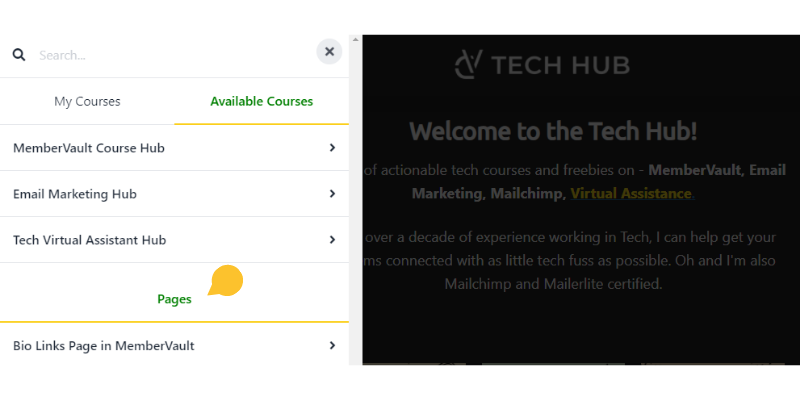
You can set the status to Invisible and just share the link where needed. That’s what most of mine are. This is handy if you want it to be a resource page for a particular product for example.
What’s on my wishlist?
Like many MV users, I was excited by the initial announcement. Which turned into disappointment when I saw the simple HTML editor! I wanted fancy now! Which is why I put on my CSS hat and created a few templates – including a free bio links page.
Word on the grapevine is that a “blocks” editor is coming in March. Apparently, it will be similar to using page builders along the likes of WordPress. So that will definitely be a game changer.
I would also love:
- The ability to duplicate pages
- The ability to set a social share image for each page
- A way to link a page to a product so only members of that product can see its contents
- The ability to open it as popup so if used in lessons, the user can easily get back to where they were
- A cookies policy popup
- The ability to export a page as a template
- The upcoming editor to be as drag and drop as possible
That’s probably enough to start with!
Final verdict (for now)
It is a great introduction to the concept of pages. And a welcome one if you don’t currently have a website or you have resources that could benefit from being on a web page.
The great news is, it will only get better. I can’t wait to use it when the blocks editor lands. I am on the early features tester list so will be one of a few to get my hands on it before everyone else!
In the meantime, if you need help setting up Pages now, get in touch and let’s get your pages looking awesome.


